
Register an authentication source
Cloudbreak allows you to register an existing LDAP/AD instance and use it for multiple clusters. You must create the LDAP/AD prior to registering it with Cloudbreak.
Once you have it ready, you can:
- Register an existing LDAP in Cloudbreak web UI or CLI.
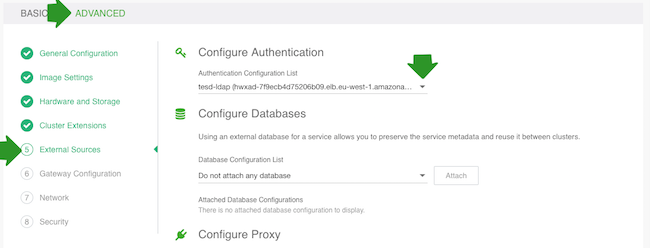
- Use it as an authentication source for your clusters. Once registered, the LDAP will now show up in the list of available authentication sources when creating a cluster under advanced External Sources > Configure Authentication.
Steps
- From the navigation pane, select External Sources > Authentication Configurations.
- Select Register Authentication Source.
- Provide the following parameters related to your existing LDAP/AD:
GENERAL CONFIGURATION
Parameter Description Example Name Enter a name for your LDAP. cb-ldap Directory Type Choose whether your directory is LDAP or Active Directory. LDAP LDAP Server Connection Select LDAP or LDAPS. LDAP Server Host Enter the hostname or IP address for the LDAP or AD server. 10.0.3.128Server Port Enter the LDAP server port. 389LDAP Domain (Optional) Enter your LDAP domain if applicable. ad.mytestldap.comLDAP Bind DN Enter the LDAP Bind DN. CN=Administrator,CN=Users,DC=ad,DC=hdc,DC=comLDAP Bind Password Enter the LDAP Bind DN password. MyPassword1234!USER CONFIGURATION
Parameter Description Example LDAP User Search Base Enter your LDAP user search base. This defines the location in the directory from which the LDAP search begins. CN=Users,DC=ad,DC=hdc,DC=comLDAP User Name Attribute Enter the attribute for which to conduct a search on the user base. HDCaccountNameLDAP User Dn Pattern Enter LDAP User DN Pattern, which is used to bind an LDAP user. CN={0},CN=Users,DC=ad,DC=hdc,DC=comLDAP User Object Class Enter the directory object class filter for users. personGROUP CONFIGURATION
Parameter Description Example LDAP Group Search Base Enter your LDAP group search base. This defines the location in the directory from which the LDAP search begins. CN=Users,DC=ad,DC=hdc,DC=comLDAP Admin Group (Optional) Enter your LDAP admin group if applicable. hdcLDAP Group Name Attribute Enter the attribute for which to conduct a search on groups. cnLDAP Group Object Class Enter the directory object class filter for groups. groupLDAP Group Member Attribute Enter the attribute on the group object class that represents members. member - Click Test Connection to verify that the connection information that you entered
is correct.
 NoteThe Test Connection option:
- Does not work when an external authentication source uses LDAPS with a self-signed certificate.
- Might not work if Cloudbreak instance cannot reach the LDAP server instance.
- Click REGISTER.
- The LDAP will now show up on the list of available authentication sources when creating
a cluster under advanced External Sources > Configure Authentication.
It can be reused with multiple clusters. Just select it if you would like to use it for
a given cluster: